AITM doesn't just read your source files — it builds a structured, queryable model of what your code actually does, so the AI stops guessing and starts checking.
How AITM Understands Your Project
Behavioral contracts
Every meaningful feature in your codebase can be captured as a behavioral contract: a machine-readable spec with an id, the module it belongs to, a one-line behavior description, the exact files it touches, a danger zone warning, and a confidence score. Contracts are stored per project in a local SQLite database, and the AI queries them over GraphQL before it touches a single line of code. That's the single biggest reason hallucinated file paths and invented methods drop off — the AI checks the contract instead of guessing.
Contracts don't go stale either: after every merge, the docs pipeline step automatically re-scans the change and updates any contract it affected.
Danger zones
Each contract can carry a danger zone — a plain-English warning about the blast radius of touching that code (say, "never call this without checking the skip flag first"). The AI reads danger zones up front, so it knows what NOT to break before it starts editing, not after a test fails.
The knowledge graph
Behind one GraphQL endpoint sit ten interconnected sources of truth about your project:
- The variables tree (
BL.*business-logic codes,UI.*interface codes) - Behavioral contracts
- The DOM element map
- The hint dictionary
- The documentation index
- The code map — imports/exports, high-coupling "god nodes", and module communities
- The test map — UI element to Playwright locator
- Screenshots
- Bugs
- Cross-module edges linking all of the above together
One query can pull related context across all ten sources at once, instead of the AI grepping blindly across your whole repository.
Project onboarding
When you import a project for the first time, AITM runs a deterministic static pre-scan before any AI touches it: language and stack detection, a full code map, DOM extraction via data-aitm attributes, variable backfill, and documentation pointers. Only after that does AITM optionally run AI passes — architecture discovery, git history mining for module coupling, and a deep per-module pass. In short: import a repo, and AITM maps it before the first task ever runs.
DOM map + Dev Panel
Real UI elements in your app are tagged with data-aitm attributes, each carrying trigger and triggered-by effect edges plus a pixel rect map of where it sits on screen. That map is what feeds reliable, self-healing E2E test selectors instead of brittle CSS locators.
What the Dev Panel does
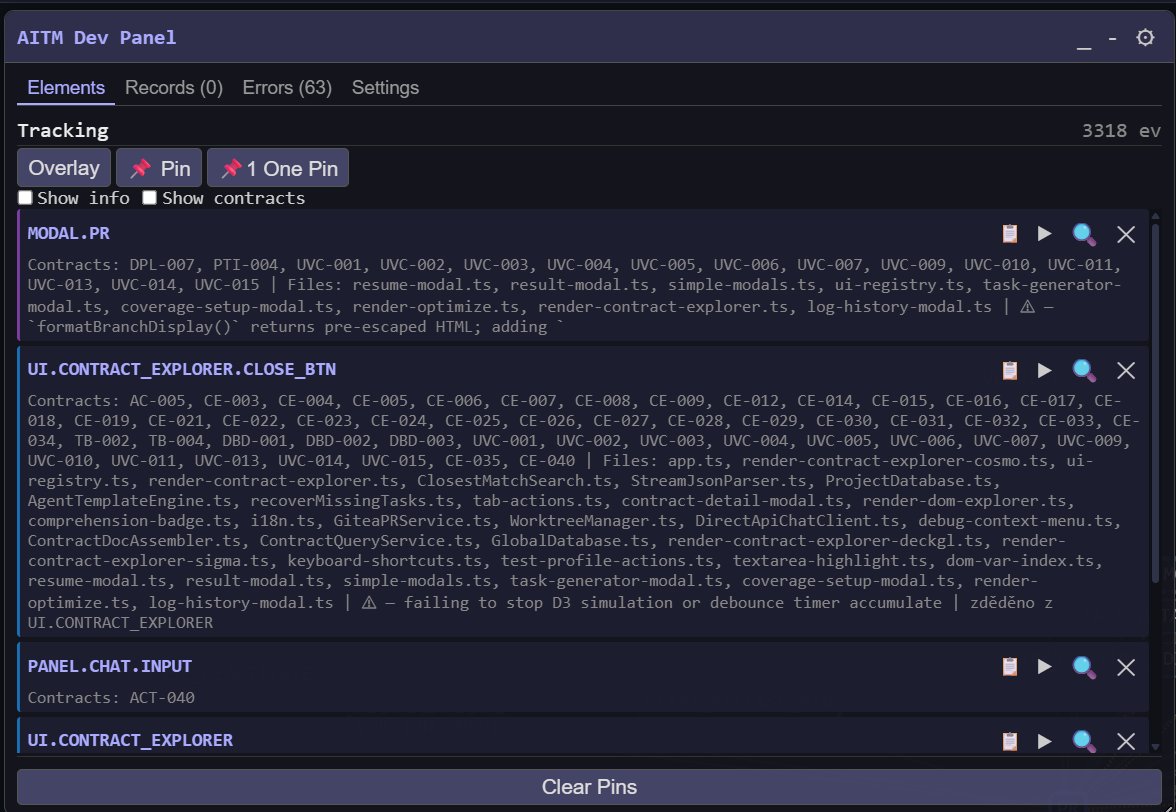
The Dev Panel is a self-contained, injectable JS toolbar (aitm-dev-panel.js) any AITM-managed project can load during development. It's a floating, dockable toolbar that overlays every data-aitm-tagged element in your running app with a badge: a hover tooltip shows the element's code, tag, action, and handler, a live event counter keeps running, a small chat/brainstorm box lets you message the AITM instance directly from your running app, and there are font-size controls plus an online/offline status indicator for AITM itself. The panel tracks real user interactions (click/change/input/mount/unmount) as they happen and flushes them to AITM every 2 seconds — that's how AITM keeps its map of your UI up to date.
The panel has four tabs: Elements (the elements you clicked or pinned, with their variable code, contracts, files and danger-zone warnings; the Overlay, Pin / One Pin and Clear Pins buttons), Records (the recorded UI elements), Errors (captured JavaScript and console errors, which can be turned into bug tasks in AITM) and Settings. Its full documentation opens in AITM from the header menu: Help → AITM Dev Panel.
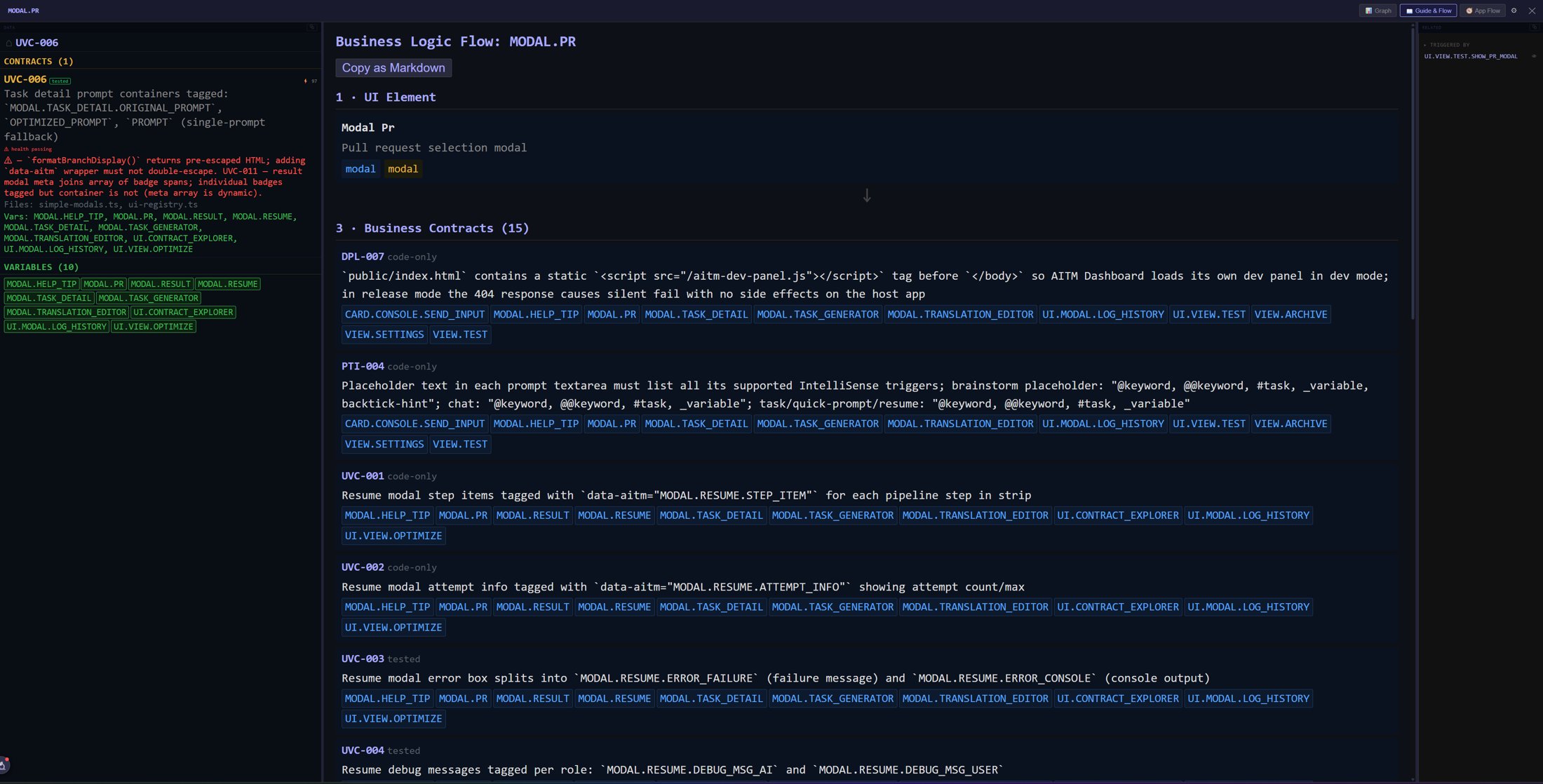
Guide & Flow — an element's business-logic flow
From an element's row in the Dev Panel you open its detail with the tabs Graph, Guide & Flow and App Flow. Guide & Flow explains the selected element top-down in plain steps — the UI element itself and then the business contracts that describe its behavior (each with the variables it concerns). Copy as Markdown copies the whole explanation to the clipboard, ready to paste into a task prompt. More in Contract Explorer & App Flow.
Enabling and disabling it per project
It's a single conditional <script> tag added to your project's shared HTML shell, shown only outside Production, with a data-project="<your-project-id>" attribute so the panel automatically targets the right project.
Blazor Server (.NET 8+)
In App.razor, inject IWebHostEnvironment and guard the script tag with IsProduction():
@inject IWebHostEnvironment env

@if (!env.IsProduction())
{
    <script src="http://localhost:3333/aitm-dev-panel.js" data-project="your-project-id"></script>
}
ASP.NET Core Razor Pages
Same pattern — @inject IWebHostEnvironment env plus the same IsProduction() guard — placed in the shared _Layout.cshtml, using the same code block as above.
Node / Express / TypeScript
Guard it with process.env.NODE_ENV in the template that renders your HTML shell:
{process.env.NODE_ENV !== 'production' &&
  '<script src="http://localhost:3333/aitm-dev-panel.js" data-project="your-project-id"></script>'}
To disable it, remove the conditional script tag, or simply run the app in Production — the guard hides it automatically without needing to touch the tag.
Tips
- If the AI seems to "already know" a file it's never opened this session, that's a contract query at work, not a lucky guess.
- A contract's danger zone is worth reading even when you're changing the code yourself — it's often the fastest way to spot a hidden dependency.
- Re-importing a project after major refactors lets the onboarding pre-scan catch up with your new structure.