One license, a number of project slots — use them on whatever projects matter to you, and swap anytime.
Licensing & Project Slots
The model
A license grants a number of project slots. Each slot lets you manage one project (grouped at the tab/workspace level) in AITM — pipeline tasks, chat, brainstorm, and onboarding all run for licensed projects. Each license covers 1-5 project slots, chosen when you purchase. You can change your slot count later from Add Slot or Change Slots on your account dashboard, up to the 5-project maximum.
What counts against a slot
Adding a project beyond your slot count asks you to free up a slot or upgrade — it never deletes anything. An unassigned project is simply paused until it's given a slot again; all of its history, tasks, and knowledge base stay exactly as they were.
Demo mode and the free 3-day trial
A fresh install with no license runs in demo mode — you can look around and evaluate AITM without entering anything. To put your projects under a license, either start the free trial or activate a key.
Trial: click License in the header and choose Start Free 3-Day Trial. Either click Sign in with Google, or enter your e-mail twice and click Send Code; AITM sends a 6-digit verification code to that address — enter it and click Verify. The trial gives you 2 project slots for 3 days; it does not apply to a project until you assign it a slot. One trial is available per e-mail address and per machine.
Activation flow
Buy on this site and your license key (format AITM-XXXXXXXX-XX) is delivered by email. In AITM, click License in the header, enter the e-mail you used for the purchase, the license key and a short label for this machine (e.g. "Work laptop"), then click Activate. Alternatively, log in to your aitm.cz account (e-mail and password, or Sign in with Google) — AITM lists the licenses on the account and you click Activate next to the one you want. After activation AITM guides you to Project Slots so you can choose which projects the license covers. AITM periodically validates your license in the background (a heartbeat) and shows the remaining days (Days Left), so you're never caught off guard.
Moving a license to another machine
- Deactivate this device releases the license on this machine only. It stays in your account and can be activated elsewhere. AITM waits for the license server to confirm and then closes.
- If the old machine is no longer available, use Transfer license to this machine on the new one. The license on the previous machine is deactivated after 24 hours. No need to contact support.
- Restore existing access on the welcome screen lets you bring a license or trial to a new machine with your e-mail and the recovery key you received at activation.
- Delete license from this machine only resets the local state. Use it when the license server no longer recognizes this device, then activate again.
Working offline and the offline token
If the license server cannot be reached, a banner shows when the last successful check was and how much of the offline grace period is left. After roughly 5 days without any contact AITM stops until the connection is restored; a trial tolerates only about a day offline. For machines that are intentionally offline, open the Offline Token tab of the license panel, paste an offline token from the customer portal and click Upload offline token. The panel shows until when the token is valid; when it expires, reconnect or upload a fresh one.
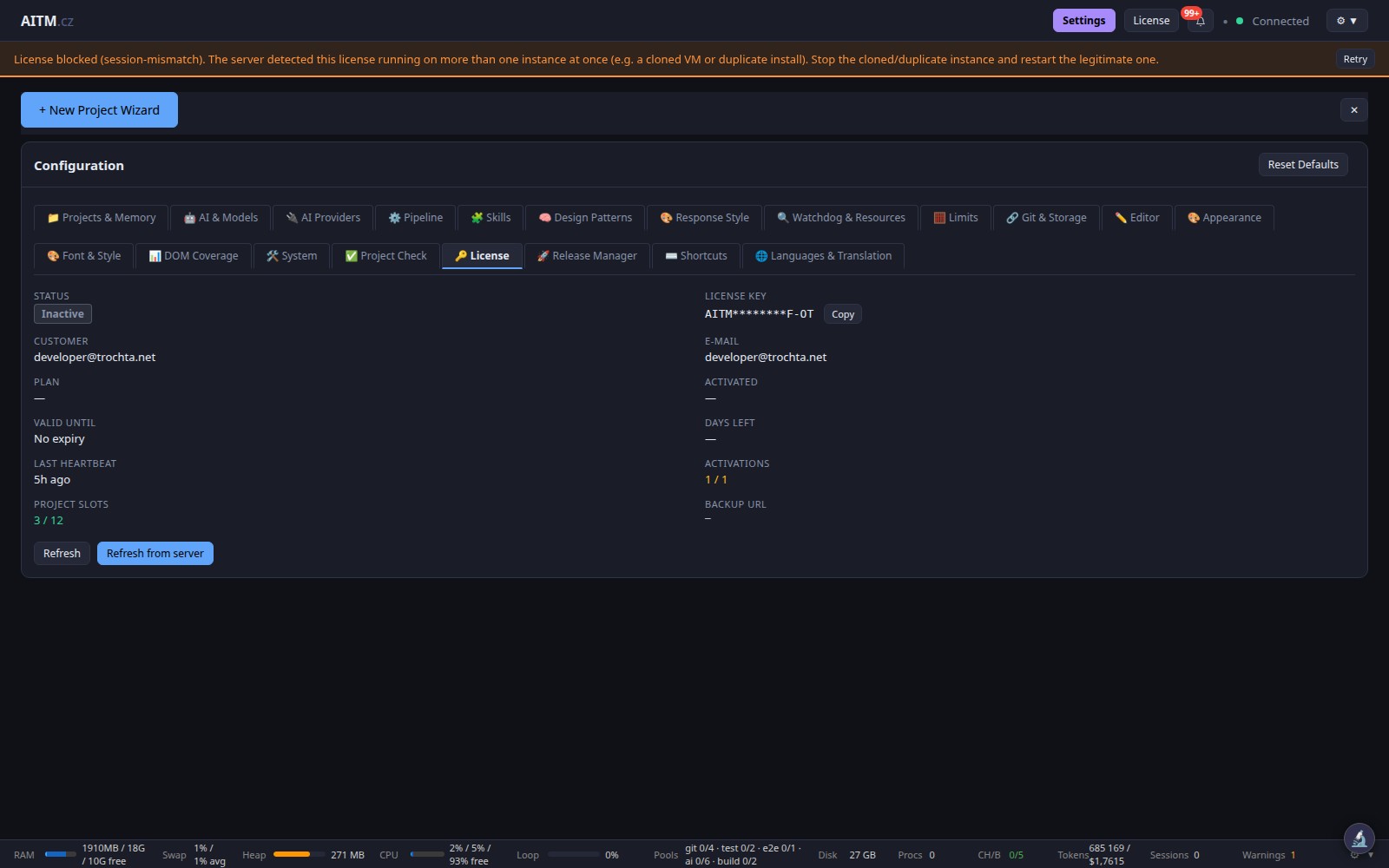
"License blocked (session-mismatch)"
This banner means the license server saw the same license running on more than one instance at once — typically a cloned virtual machine or a second install. Stop the duplicate and restart the legitimate instance. If it was a temporary glitch, Try to reconnect (or Retry on the banner) checks with the license server and unlocks AITM. States that need a real fix — a revoked license, for instance — cannot be unlocked this way. Keep one AITM instance per license.
Hardware fingerprint is masked by default
The device hardware fingerprint shown in the License view is hidden by default behind a Reveal toggle — this protects you from accidentally exposing it while screen-sharing or streaming. Click the toggle to reveal the fingerprint whenever you need to check or copy it, for example when contacting support. The License Key in Settings → License is masked the same way; use Show / Hide next to it.
What happens on expiry
When a license or trial expires, projects are no longer covered and their tasks cannot run; AITM tells you so and points you to Settings → License. Your code, tasks, history, and knowledge base all remain intact on your machine — nothing is deleted or locked away. Renewing picks up exactly where you left off.
Managing your licenses
Use the customer portal on this site to view your licenses, extend them, or expand your device count:
FAQ
- Can I swap which projects use my slots? Yes, anytime — unassign a project and assign the freed slot to another.
- Does a slot limit CPU or parallelism? No — a slot is a project, not a running task. Concurrency is set in Settings → Pipeline → Max concurrently running tasks and depends on your hardware, not on the license.
- Do I need an internet connection? Only for periodic license validation (or use an offline token). Development itself runs entirely locally.